Choosing between mail merge vs. Mailchimp sounds simple until you realize both tools send personalized emails to lists of people. Both support merge fields, both promise time savings, and both are widely recommended. So which one is actually right for your use case?
The answer depends on whether you’re doing personal outreach from your own Gmail inbox or running marketing campaigns from a branded address. Those are different jobs, and the tools are built accordingly. This comparison breaks down exactly where each tool excels — and where it falls short.
Quick Comparison: Mail Merge vs. Mailchimp at a Glance
| Feature | Mail Merge (Gmail) | Mailchimp |
|---|---|---|
| Sends from | Your personal Gmail account | Mailchimp’s servers (branded domain) |
| Best for | Personal 1:1 outreach, sales, HR | Marketing newsletters, campaigns |
| Personalization | Full field merge from Google Sheets | Merge tags, audience segmentation |
| Email limits | Gmail sending limits (500–2,000/day) | Up to 500K+/month (paid plans) |
| Deliverability | Your Gmail reputation | Mailchimp shared/dedicated IPs |
| Unsubscribe handling | Manual | Automatic (legally required) |
| Analytics | Open tracking, click tracking | Detailed campaign reports |
| Pricing | Free to low cost | Free tier; paid from $13/month |
| Setup required | Minimal (Gmail + Google Sheets) | Account creation, list setup, templates |
| CAN-SPAM compliance | User’s responsibility | Built-in |
What Is Mail Merge?
Mail merge is a technique for sending individualized emails to many recipients at once — each email looks like it was written specifically for that person. The data (names, companies, custom fields) comes from a spreadsheet; the template comes from your email draft; the tool combines them and sends one unique email per row.
In Gmail, mail merge works by connecting your inbox to a Google Sheets spreadsheet that contains your recipient list. You write one email template with placeholders like {{firstName}} or {{company}}, and the tool substitutes each person’s data before sending. Every recipient receives a separate, personalized email sent directly from your Gmail address — not a mass email or a CC chain.
This is the key distinction that separates mail merge from email marketing platforms: the email lands in the inbox as if you wrote it individually. There’s no “Sent by Mailchimp” footer, no unsubscribe link at the bottom, and no shared sending server. It comes from you.
 Try Mail Merge for Gmail
Send personalized emails directly from your Gmail inbox using Google Sheets data. No Mailchimp account needed — works with the tools you already have.
Get Started Free →
What Mail Merge Does Well
It looks personal. Because the email arrives from your actual Gmail address — not a marketing platform — it passes the “did they write this just for me?” test. Reply rates on mail merge campaigns are often 5–10× higher than equivalent Mailchimp campaigns for the same audience.
Zero learning curve if you use Gmail. If your workflow already includes Gmail and Google Sheets, mail merge adds one step: install the add-on, connect your sheet, and send. There’s no new platform to learn, no brand guidelines to configure, and no billing account to set up.
Deep personalization from spreadsheet data. Any column in your Google Sheet becomes a merge field. You can customize subject lines, opening lines, specific product names, dollar amounts, dates — anything that changes per recipient. For a detailed walkthrough, see our Gmail mail merge guide.
Works well for attachments. You can send personalized attachments with mail merge — a contract, invoice, or PDF — where each recipient gets their specific version. Mailchimp can’t do this natively.
Where Mail Merge Falls Short
Gmail sending limits. Personal Gmail accounts can send roughly 500 emails per day; Google Workspace accounts allow up to 2,000. If you need to send 50,000 emails a month, mail merge is not the right tool.
No automated sequences. Mail merge sends one batch at a time. It doesn’t have built-in drip sequences, automated follow-ups, or triggered emails based on recipient behavior. You’d need to set up and send each follow-up manually.
Compliance is your responsibility. Mail merge doesn’t automatically add unsubscribe links or handle opt-outs. For cold outreach or anything that could be classified as commercial email, you need to manage compliance yourself.
What Is Mailchimp?
Mailchimp is an email service provider (ESP) built for marketing campaigns. You upload a contact list, design an email template using a drag-and-drop editor, and send from a Mailchimp-hosted domain. The platform handles deliverability, bounce management, unsubscribes, and campaign analytics at scale.
Mailchimp’s architecture is fundamentally different from mail merge. Emails are sent from Mailchimp’s servers (sometimes from a dedicated IP you rent), not from your personal inbox. Every email includes an unsubscribe link, and the “From” address is typically a branded domain like marketing@yourcompany.com rather than your personal Gmail.
What Mailchimp Does Well
Volume at scale. Mailchimp’s paid plans handle hundreds of thousands of emails per month. If you’re sending a weekly newsletter to 10,000 subscribers or a product announcement to your entire customer base, Mailchimp is built for that.
Campaign management. Mailchimp stores your contact lists, segments audiences by behavior or demographics, and tracks every campaign over time. You can A/B test subject lines, automate welcome sequences, and build multi-step drip campaigns — all from one dashboard.
Design tools. Mailchimp’s drag-and-drop email builder makes it easy to create on-brand HTML emails with images, buttons, and structured layouts. For teams that need a consistent visual identity across all communications, this matters.
Built-in compliance. CAN-SPAM and GDPR compliance is built in: every email includes a physical address and an unsubscribe link. Mailchimp automatically suppresses unsubscribed contacts and processes bounce reports.
Reporting. Mailchimp’s analytics show open rates, click rates, unsubscribes, spam complaints, and revenue attribution (on paid plans). The reporting is detailed enough to optimize campaigns over time.
Where Mailchimp Falls Short
It doesn’t look personal. The words “Sent by Mailchimp” or an automated-looking email format signal to recipients that this is a marketing email, not a personal message. Response rates are typically lower for transactional or relationship-driven outreach.
Free tier is increasingly limited. Mailchimp’s free plan was once generous; today it limits you to 500 contacts and 1,000 sends per month, removes most automation features, and includes Mailchimp branding in your emails. Most real use cases require a paid plan ($13–$350/month depending on list size).
Overkill for simple outreach. If you need to send 50 personalized follow-up emails after a conference, setting up a Mailchimp account, creating a list, building a template, and configuring a campaign is far more effort than opening a Google Sheet and using mail merge.
Mail Merge vs. Mailchimp: Key Differences in Practice
The email marketing vs. mail merge distinction comes down to one question: should your email look like it came from your inbox, or from a marketing department?
Deliverability: Mail merge emails are sent through your Gmail account. Your personal sender reputation applies — which is generally excellent for personal accounts with healthy sending habits. Mailchimp uses shared or dedicated IPs, which means your deliverability depends partly on Mailchimp’s infrastructure and partly on your engagement rates.
Personalization depth: Both tools support merge fields. The difference is that mail merge personalization can happen in any part of the email — subject line, body, P.S. line — and each email is truly unique. Mailchimp’s personalization is real but constrained by its template format and what’s stored in your audience fields.
Volume vs. relationship: Mailchimp is optimized for volume and consistency. Mail merge is optimized for the feel of a personal relationship at scale. For a full breakdown of how to maximize personalization in Gmail, see our guide on Google Sheets mail merge use cases.
When to Use Mail Merge
Mail merge is the right tool when:
- You’re doing sales outreach or follow-up. Cold emails, warm follow-ups after a meeting, proposal sends — anything where a personal tone dramatically affects the outcome.
- You need to send from your personal Gmail address. Recruiting emails, partnership outreach, event invitations where your identity and relationship matter.
- Your list is under 2,000 contacts. Within Gmail’s sending limits, mail merge handles virtually any professional outreach scenario.
- You want to personalize deeply. Custom opening lines, references to each recipient’s company, product-specific pricing — any level of per-row customization that a spreadsheet can hold.
- You need to attach individual files. Contracts, proposals, invoices, certificates — one file per recipient.
- You’re already in Google Workspace. Gmail + Google Sheets + Mail Merge requires no new accounts, no billing, and no learning curve.
When to Use Mailchimp
Mailchimp is the right tool when:
- You’re running a newsletter or broadcast. Weekly updates, product announcements, event promotions to your subscriber list.
- Your list is large. 5,000, 50,000, 500,000 contacts — volume that exceeds Gmail’s daily sending limits.
- You need automated sequences. Welcome series, abandoned cart emails, post-purchase follow-ups — multi-step email flows that trigger based on behavior.
- Visual design matters. HTML emails with images, product grids, and buttons that match your brand style guide.
- Compliance is a must. Regulated industries or large marketing lists where CAN-SPAM and GDPR management must be automatic, not manual.
- You want aggregate campaign analytics. Comparing open rates across campaigns, segmenting performance by audience, optimizing sends over time.
When to Use Both
Many teams use mail merge and Mailchimp for different parts of their workflow — and that’s the right call.
A SaaS company might use Mailchimp for their weekly product newsletter (10,000 subscribers, branded HTML template, automated welcome sequence) and mail merge for personalized sales outreach (200 target accounts, custom emails referencing each company’s specific pain point, sent from the sales rep’s Gmail).
A nonprofit might use Mailchimp for their donor newsletter and year-end appeals, and mail merge for individual grant acknowledgment letters and board meeting invitations.
The tools aren’t in competition — they serve different communication needs. The mistake is using Mailchimp for everything (including personal outreach, where it performs poorly) or using mail merge for everything (including mass campaigns, where it hits limits quickly).
Mail Merge for Gmail
Send personalized bulk emails directly from your Gmail inbox. Connect Google Sheets, add merge fields, and send — every recipient gets a unique email that looks individually written.
Start Sending for Free →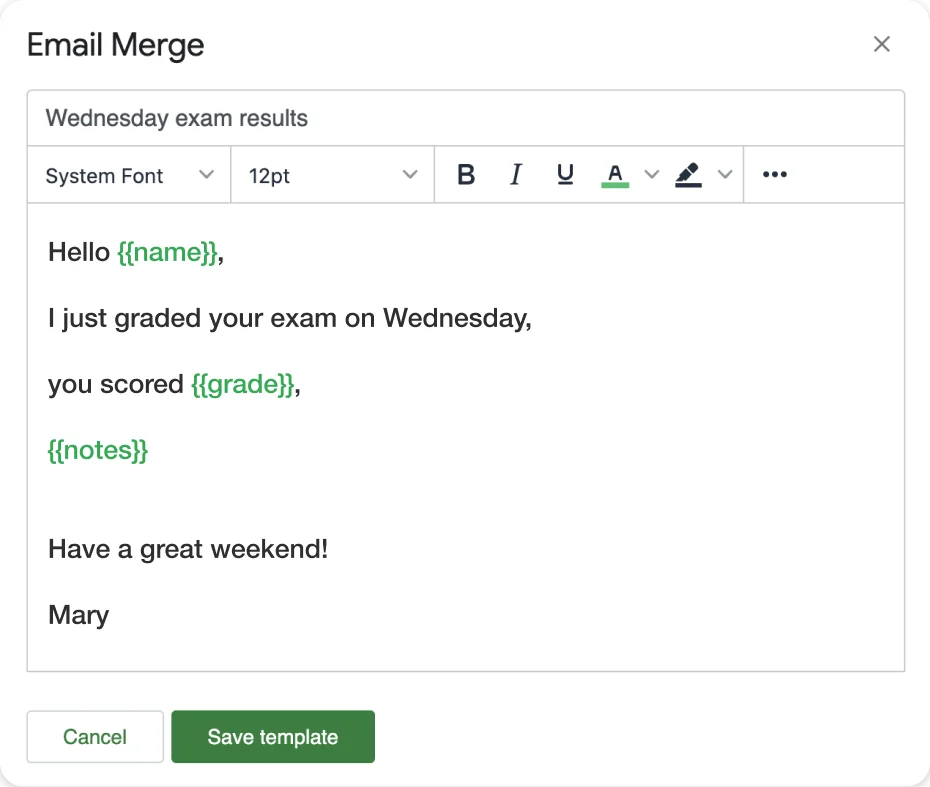
Frequently Asked Questions
Conclusion
The mail merge vs. Mailchimp decision comes down to what kind of email you’re sending. Use mail merge when the email needs to feel personal — sales outreach, recruiting, partnership inquiries, individual client communications. Use Mailchimp when you’re broadcasting to a large list — newsletters, product updates, marketing campaigns.
For most Gmail users doing professional outreach, mail merge is the more effective choice: it costs less, requires less setup, and produces emails that recipients actually reply to. Mail Merge for Gmail lets you start sending personalized emails in minutes using the Google Sheets data you already have.
If your use case involves both personal outreach and mass marketing, run both tools in parallel — each doing the job it’s actually built for.
For more on using Gmail effectively at scale, see our guide to sending personalized bulk emails in Gmail.