

Quick answer: a cold email template that gets replies has a short subject line, one sentence about why you picked this person, one line of proof and a single question, all in 50 to 125 words. Copy one of the nine templates below, then replace every placeholder with a fact about the recipient.
A cold email template saves you from a blank draft, but the template is not what earns the reply. The emails that get answered are short, written for one specific reader, and end with a question that takes ten seconds to answer. This guide gives you nine cold email templates for sales, recruiting, job search and research, the data on what works, and the steps to send them from Gmail with Mail Merge, one personalized email per row of a Google Sheet.
Key Takeaways
- Keep the body between 50 and 125 words. In Boomerang’s study of more than 40 million emails, that range got response rates above 50%.
- Ask one clear question. Emails with one to three questions were 50% more likely to get a response than emails with none.
- Expect single digits. Instantly’s 2026 benchmark puts the average cold email reply rate at 3.43%, and the top 10% of campaigns at 10.7% or more.
- Follow the rules. In the US, the CAN-SPAM Act covers business-to-business email and requires an honest subject line, a postal address and a working opt-out.
What makes a cold email template work
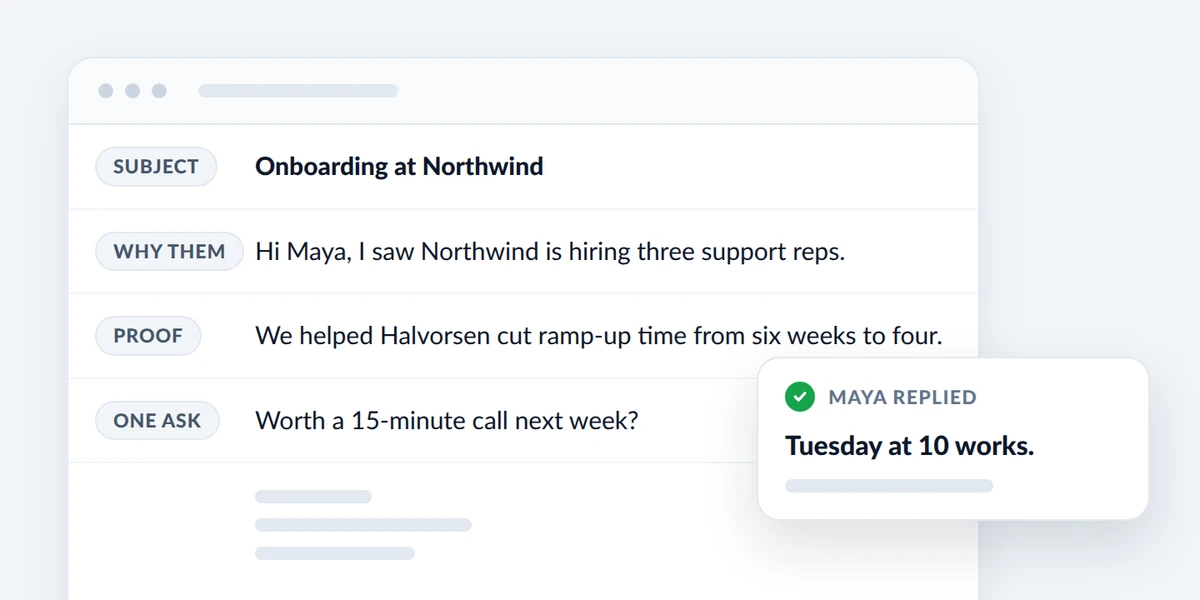
A cold email is a first message to someone who does not know you: a prospect, a hiring manager, a professor or a possible partner. There is no relationship to lean on, so every line has to earn the next one. Five parts do the work, and they make up the cold email format that every template below follows.
- Subject line: Says what the email is about in a few plain words.
- Why them: One sentence that could only be written to this person, such as a job posting, a launch, an article or a mutual contact.
- Proof: One line that shows you have done this before, such as a result, a similar customer or a relevant project.
- One ask: A single question that is easy to answer, for example yes or no, or this week or next.
- Sign-off: Your name, role and company, so the reader can check that you are real.
How long should a cold email be?
Short, but not a one-liner. Boomerang analyzed more than 40 million emails and found a sweet spot between 50 and 125 words, where response rates stayed above 50%. Longer messages did worse, with about 44% for 500 words. The study covers every kind of email its users were waiting on, not only cold outreach, so read those percentages as a direction and not as a forecast.
Cold email data points the same way. Instantly’s 2026 cold email benchmark report found that the best-performing campaigns keep emails under 80 words.
| What to tune | Target | Source |
|---|---|---|
| Body length | 50 to 125 words, under 80 for a first touch | Boomerang, Instantly |
| Subject line | 3 to 4 words | Boomerang |
| Questions | 1 to 3, ideally one | Boomerang |
| Reading level | Short words and short sentences | Boomerang |
The last row surprises most people. In Boomerang’s data, emails written at a third-grade reading level got a 36% lift over emails written at a college reading level.
What reply rate should you expect?
Even a strong template is ignored most of the time. Instantly’s report, built on platform data from January 1 to December 18, 2025, puts the average reply rate at 3.43%. The top quarter of campaigns reach 5.5% or more, and the top 10% reach 10.7% or more.
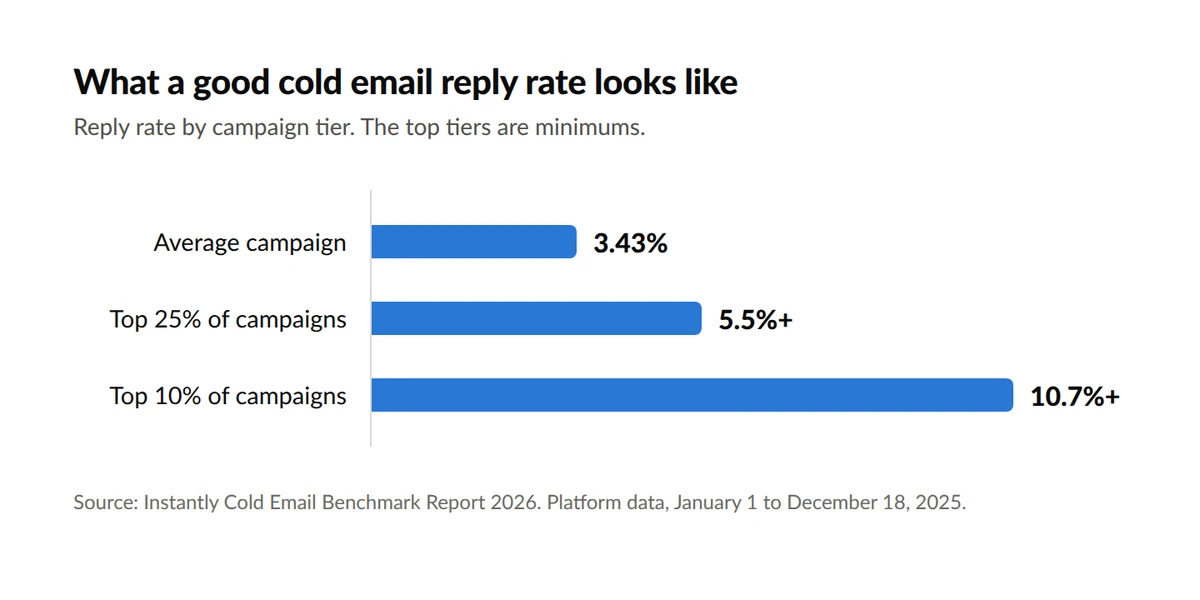
The report credits the gap to micro-segmentation and problem-focused messaging, not to clever wording. A template sent to the wrong list will not reach the top tier. If you are still deciding who to write to, start with our guide to building a B2B email list.
9 cold email templates you can copy
Every template below stays under 90 words. Two kinds of placeholder appear in them.
- Double curly braces, such as {{First name}} or {{Company}}, are merge tags. Each one is a column in your Google Sheet, and it is filled in for every recipient when you send.
- Square brackets, such as [your result], are parts you write once for the whole campaign.
1. Cold email template for B2B sales: lead with the problem
Subject: [Problem] at {{Company}}
Hi {{First name}},
Most [role] teams I talk to lose [amount of time or money] to [specific problem]. Is that true at {{Company}} too?
We helped [similar customer] [specific result] in [timeframe].
Would a 15-minute call next week be worth it to see whether the same approach fits?
[Your name], [your company]
Use it when you sell to one clearly defined role and know its most common problem.
2. B2B sales: the trigger event
Subject: Saw the news about {{Company}}
Hi {{First name}},
I saw that {{Company}} {{Trigger}}. Teams at that stage often run into [problem] within a few months.
[One sentence on how you solve it, with a number.]
Is this on your list for this quarter?
[Your name], [your company]
Use it when something just changed for the recipient. Put a short phrase such as “opened a second office in Austin” in a Trigger column of your sheet.
3. Finding the right person
Subject: Who handles [topic] at {{Company}}?
Hi {{First name}},
I am trying to reach the person who owns [topic] at {{Company}}. We help [type of company] [outcome in a few words].
Is that you, or is there someone better to speak with?
Thanks, [your name]
Use it when you are not sure who owns the decision.
4. Meeting request
Subject: 15 minutes on [topic]?
Hi {{First name}},
I work with [type of team] on [topic], and {{Company}} came up because of [specific reason].
I have one idea that could [specific outcome]. It takes 15 minutes to walk through.
Does Tuesday or Thursday next week work for a short call?
[Your name]
Use it when you already have a concrete idea to share.
5. Freelancer or agency pitch to a new client
Subject: An idea for {{Company}}‘s [page or channel]
Hi {{First name}},
I was looking at {{Company}}‘s [page or asset] and noticed [specific issue that can be fixed].
I recently fixed the same thing for [client], and [result].
Want me to send two or three quick suggestions? There is no charge and no call needed.
[Your name]
Use it when you can point to something visible, such as a slow page or a confusing signup form.
6. Recruiting a candidate who is not looking
Subject: {{Role}} role at [your company]
Hi {{First name}},
Your work on {{Project}} caught my eye, especially [specific detail].
We are hiring a {{Role}} to [one-line mission]. The salary range is [range] and the team is [remote or location].
Are you open to a 20-minute conversation, even just to compare notes?
[Your name], [your company]
Use it when you source candidates yourself. Name the salary range and the location up front.
7. Job seeker to a hiring manager
Subject: [Role] with [your strongest result]
Hi {{First name}},
I am a [role] with [number] years in [field]. I have followed {{Company}} since [specific reason], and I noticed your team is growing.
In my last role I [specific result with a number].
Could I send you a short summary of how I would approach the role?
[Your name]
Use it when you are writing to a team lead and not to a general careers inbox.
8. Student to a professor or lab
Subject: Student interested in your work on {{Topic}}
Dear Professor {{Last name}},
I am a [year] [major] student at [university]. I read your paper on {{Topic}} and was struck by [specific finding or method].
I have experience with [relevant course, tool or project] and would like to contribute to your lab this [term].
Would you have 15 minutes to talk about whether there is a fit? My CV is attached.
[Your name]
Use it when you are asking about a research position or an internship. Name one paper per professor.
9. Networking or an informational chat
Subject: Question about your path to {{Role}}
Hi {{First name}},
I am [who you are in one line]. Your move from [previous role] to {{Role}} at {{Company}} is the path I hope to follow.
Would you be open to a 15-minute call in the next few weeks? I have three specific questions and will keep to the time.
Thank you either way, [your name]
Use it when you want advice and not a job.
Cold email subject lines that get opened
The subject line decides whether the rest of your template is ever read. Five patterns cover most situations.
| Pattern | Example |
|---|---|
| Name the topic | Onboarding at {{Company}} |
| Ask a short question | Who handles hiring at {{Company}}? |
| Point to a trigger | Your new Austin office |
| Offer something specific | Two ideas for your pricing page |
| Say who you are | Data analyst, five years in logistics |
Three rules apply to all of them.
- Keep it short: Boomerang found that subject lines of 3 to 4 words received the most responses, and that response rates dropped slowly as more words were added.
- Never fake a thread: Google’s email sender guidelines tell senders not to start a subject line with “Re:” or “Fwd:” unless the message is an actual reply or forward.
- Make it match the email: The FTC’s guidance on the CAN-SPAM Act says the subject line must accurately reflect the content of the message.
A merge tag in the subject makes every line different. On the Mail Merge Professional plan, the A/B subject test tries two or three subject lines on the same campaign and shows which one is leading.
How to send a cold email template from Gmail with Mail Merge
Pasting a template into 40 separate drafts is slow, and one BCC message gives everyone the same generic text. Mail Merge for Gmail is a Google Workspace add-on from Qualtir that sends one individual email per row of a Google Sheet, through your own Gmail account. It works like any mail merge in Gmail: your sheet holds the facts, and your template holds the placeholders.
Step 1: Put your prospects in a Google Sheet
Use one row per person and put the column names in the first row: Email, First name, Company, plus any column a template needs, such as Trigger, Role or Topic. According to the Mail Merge tutorial, each row of your sheet is one email and the column names become your merge tags.
Research is the slow part, and it is the part that matters. Ten rows with a real trigger each are worth more than 200 rows with only a first name.
Step 2: Save your template
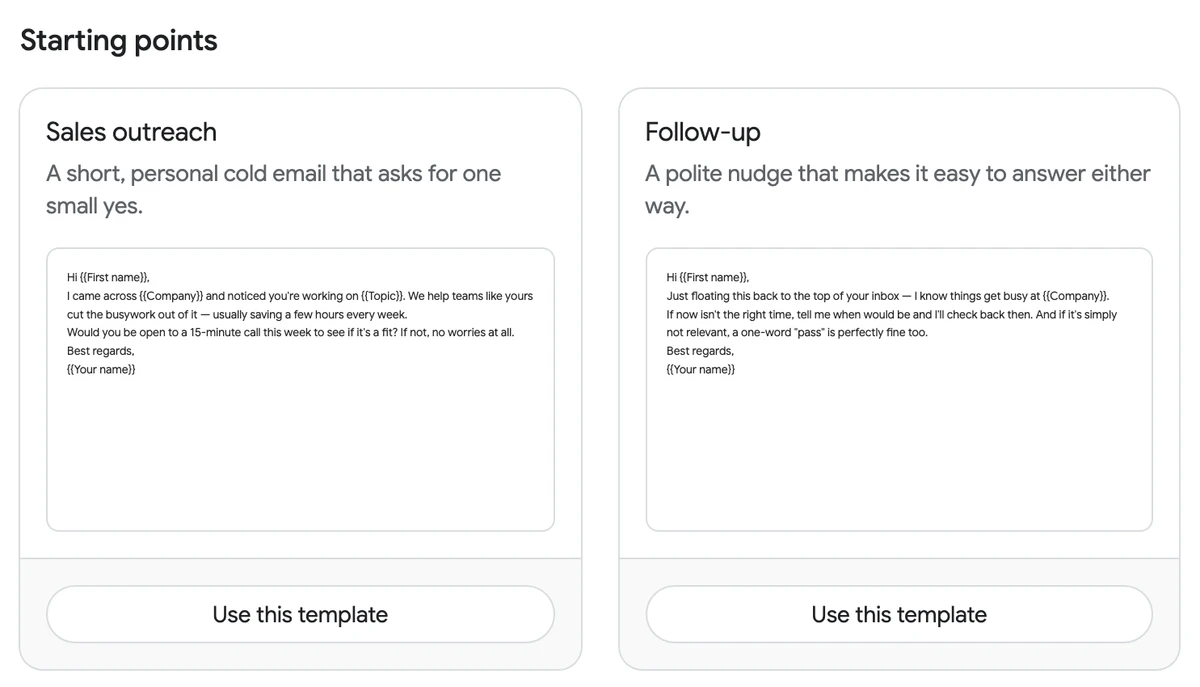
Open Templates in Mail Merge and click New template, then paste one of the templates above. You can also click Browse gallery and start from Sales outreach, one of six starting points listed in the templates documentation. The gallery’s Generate with AI option drafts a template from a description of your audience, goal and tone. The Free plan stores up to three saved templates.
Step 3: Personalize with merge tags
- Open the builder. In your sheet, go to Extensions, then Mail Merge for Gmail, then New campaign. Your recipients are already loaded.
- Insert the template. Click select a template in the empty editor, or write the email directly.
- Add the tags. Click Merge tag in the toolbar and pick a column. Tags work in the subject line as well as in the body.
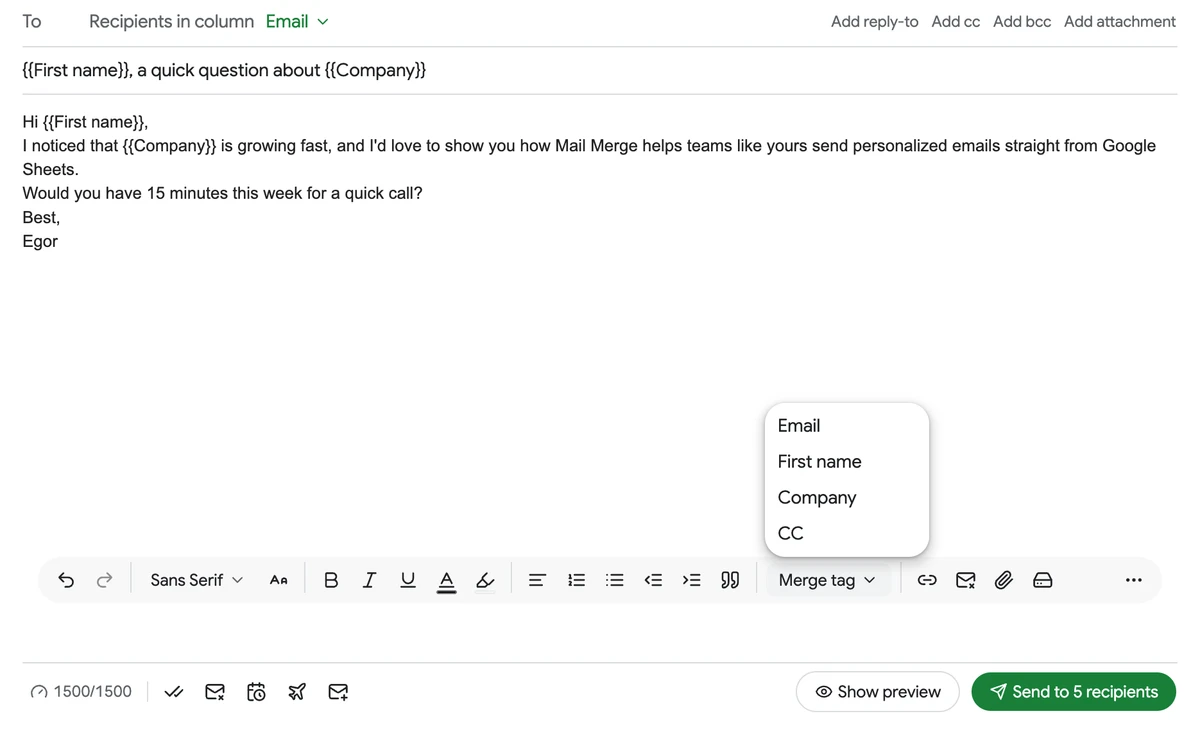
On the Professional plan, an AI field goes one step further. The campaigns documentation describes it as a merge tag whose value is written by AI for every recipient from that recipient’s own row, for example an icebreaker built from the Company and Website columns.
Step 4: Preview every email, then send
Click Show preview. Mail Merge renders the email for each recipient with the tags filled in, and you can page through them with the arrows. A deliverability check warns about common problems such as a missing unsubscribe link. Send me a test puts a real copy in your own inbox.
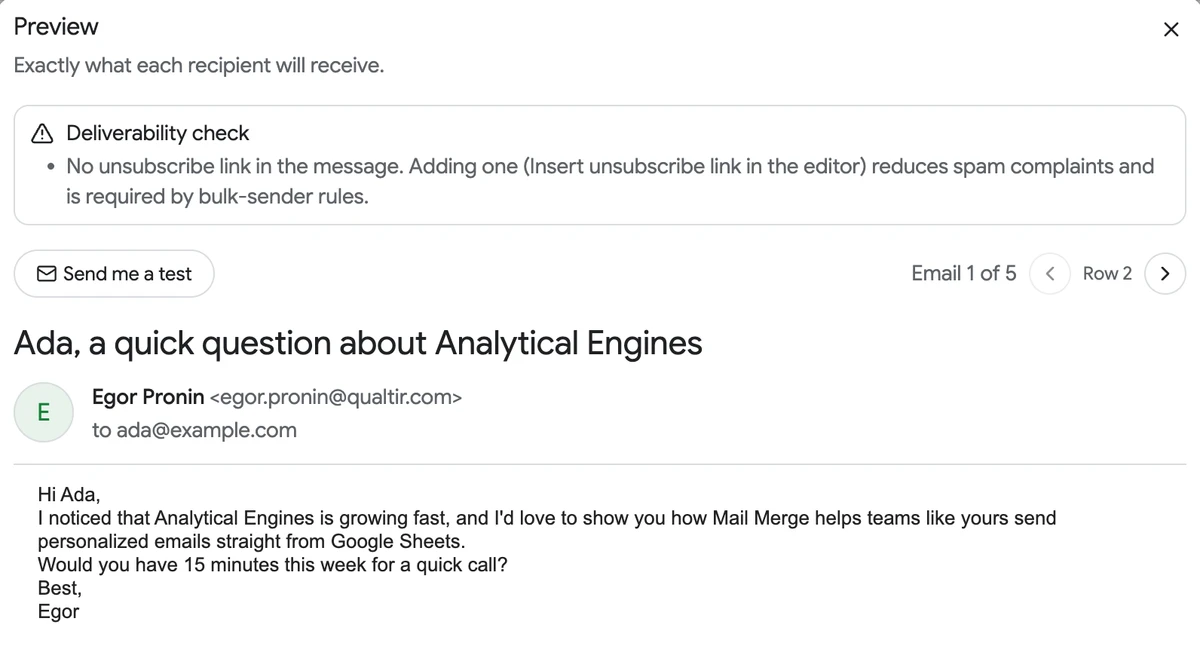
When every preview reads like a personal note, click Send to N recipients. Mail Merge adds a status column to your sheet that shows Sent, then Read when open tracking is on. Paid plans can also schedule the campaign for a better day or hour, and our guide to the best time to send cold emails covers which ones to pick.
Step 5: Add a follow-up
One email is rarely enough. In Instantly’s data, 58% of replies come from the first email and the other 42% come from follow-ups. In the builder, Add follow-up chains up to five more emails. Per the follow-up sequences documentation, each step is sent 1 to 30 days after the previous one, by default only to recipients who did not open it, and anyone who replied, bounced or unsubscribed is skipped. Follow-up sequences are part of the Professional plan.

For the wording of those steps, see our templates for a follow up email after no response.
 Try Mail Merge
Turn one cold email template into individual, personalized emails sent from your own Gmail account. Merge tags in the subject and body, a preview of every message and open tracking are included. Free to start.
Get Started →
How many cold emails you can send per day
| Mail Merge plan | From an @gmail.com address | From a Google Workspace address | Price |
|---|---|---|---|
| Free | 50 per day | 50 per day | $0 |
| Personal | 250 per day | 250 per day | $5.99 per month |
| Professional | 500 per day | 1,500 per day | $8.99 per month |
The figures come from the Mail Merge daily sending limits and pricing pages at the time of writing. Google’s own caps sit on top of them, and our guide explains how many emails you can send in a day in Gmail.
For cold email, the plan limit is a ceiling and not a goal. Instantly’s report advises new sending domains to start with 5 to 10 emails per day and to increase gradually over 4 to 6 weeks.
Rules that keep cold email legal and out of spam
In the United States, cold email is regulated by the CAN-SPAM Act. The FTC’s CAN-SPAM compliance guide says the law covers all commercial messages and “makes no exception for business-to-business email”. For a sales template, that means five things.
- Honest headers and subject line: The From, To and Reply-To information must be accurate, and the subject must reflect the content.
- Say that it is an ad: The law leaves you a lot of leeway in how, but the disclosure must be clear.
- A postal address: Include a valid physical postal address, which can be a street address or a registered post office box.
- A way to opt out: Tell recipients how to stop future email, and honor each request within 10 business days.
- Your responsibility: Hiring another company to send for you does not remove it.
According to the same guide, each separate email in violation is subject to penalties of up to $53,088.
Google’s sender guidelines add the inbox side. Every sender to personal Gmail accounts must authenticate with SPF or DKIM and keep the spam rate reported in Postmaster Tools below 0.30%. The same page tells senders not to buy email addresses and not to send messages to people who did not sign up, because those recipients might mark the messages as spam.
A cold email is unsolicited by definition, so that last point is the real constraint. Keep each list small and researched, make every message relevant to its reader, and give people an easy way out. In Mail Merge, the Unsubscribe link switch adds an opt-out footer to every email, and the unsubscribe link documentation confirms that unsubscribed addresses are skipped in every future campaign.
FAQ
Start with one template and ten recipients
A cold email template works when it is short, specific and easy to answer. Pick the template that matches your goal, research ten people well enough to fill every placeholder, and send. Measure the replies, change one thing, and repeat with the next ten.
When you are ready to send, Mail Merge for Gmail turns your Google Sheet and your template into individual emails, with previews, open tracking and follow-ups in one place.


